


How to Make a Smoke Brush in Illustrator
Using smoke on your compositions can add a nice atmosphere and ambience. Unfortunately, taking pictures of smoke is a total pain, and going through the whole ordeal of making them transparent to be able to use it over any background (or convert it to a brush if you want...Read more

How to Make a Neon Glow Effect in Illustrator
Emulating a neon effect in Illustrator can be easily accomplished by using a versatile panel called Appearance. With this panel, you can create a wide range of effects, from a simple drop shadow to a 3d effect while keeping your original design intact. Today, I'll show ...Read more

Make a 70s Text Effect in Illustrator
When you think about making "text effects", your first thought is probably Photoshop. Makes sense, it is the first choice of many users around the world. But sometimes certain effects are so much easier to make in Illustrator and sometimes you don't even need to make an...Read more

How to Easily Make an Overlapping Circle Pattern in Illustrator
Patterns are a great resource that every designer should have in their toolbox. But sometimes, sifting through the entire internet for the right pattern for your specific design is obnoxiously time consuming. Luckily for us, making patterns in Illustrator has become eas...Read more

How to Make a Stepped Text Effect in Illustrator
Sometimes what seems to be a super complex Illustrator text effect can actually be quickly made using nothing but AI's default application tools. Although the effect you'll learn to make today is made using a destructive process (meaning that you can't edit the text aft...Read more

How to Make a Random Pattern Fill in Photoshop
Patterns are one of the most important resources a designer can use. Of course there are tons of different ways to make them, either in Illustrator or in Photoshop. Although they're a bit more time consuming to make in Photoshop rather than in Illustrator, sometimes for...Read more
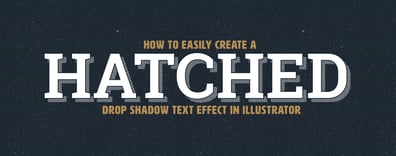
How to Easily Create a Hatched Drop Shadow Text Effect in Illustrator
Retro Text Effects are an aspect of typefaces that so many designers love; ythink like Hominis or Sunset Boulevard fonts, with that hatched drop shadow effect. But what if you want to use a different font or even a different type of hatched drop shadow effect on your he...Read more

How to Make a Linear Spiral in Illustrator
Making a Spiral in Illustrator is very easy since we have the Spiral Tool available by default. But this tool only lets us make Exponential Spirals; if we want to make a Linear Spiral then we have to use a different method with different tools. Today, you'll learn how t...Read more