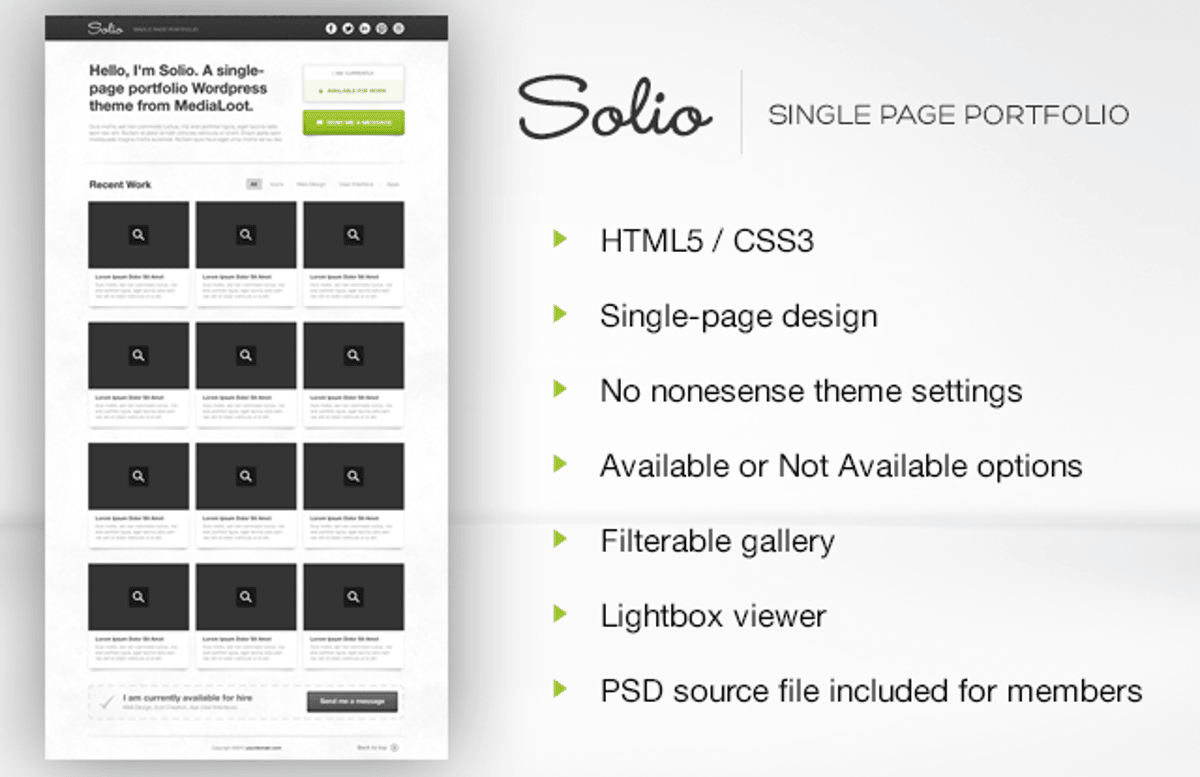
Solio - Wordpress Theme
Solio is a single-page portfolio Wordpress theme for creative professionals. Designed with creatives in mind, this theme is perfect any designer, artist, photographer, or developer that just wants an easy to manage, single page on the web with some recent work, whether or not they are available for hire, a contact button and some links to their social accounts.
Live Preview
View it in action
Free License
Feel free to download and use this item for both personal and commercial projects with attribution back to MediaLoot. Please note:
- Attribution is required for free items. For a non-attribution license, please become a member or buy the full version.
- You may not distribute or offer this set for download on other websites. Promotion is always appreciated, but please send people to this page.


Comments
Awesome looking theme… Nice work Tony!!
Thanks Nathan
Great and clean theme.
Does the Portfolio slide can contain more than 1 images? Just curious.
Love it.
@Enk. Thanks for comments, glad you like it! In the portfolio each item just has one image
Does it work with videos from Vimeo?
Thank you. I installed this theme in my wordpress, but this is not complete!
Why?
Is this for sail?
How many is this theme?
I want.
Might use this for a niche portfolio website.
Cheers,
Simon Duck
Nice theme! Would love it if it were responsive
What did you use for the category/slider thing - I’ve been looking for it for ages!
Thanks for this theme ... it seem’s to be a good start for a portfolio
LOVE IT! But it won’t let me download….Clean, beautiful, simple and exactly what I’ve been looking for!! wwah…..
Is this theme is suitable for creating a gallery of sites?
Almost. I like it, but I don’t love it. A working contact form (instead of a mailto:) would make a big difference. Also, not sure if the popup/lightbox image viewer is limited by the size of the images you used, but seems a bit on the smallish side. Would also be nice if the caption on the images was actually below the image. If I am showing off a portfolio, I don’t want something covering up my work.
Good question from Britt - can you embed video where the images are?
Nice design, just missing a bit for me. Still great for the price
I hope my feedback is helpful.
From it’s conception this theme was, and still is intended to be a simple, bare bones, single page website for designers, that requires minimal maintenance. It’s for this reason that it’s A. free and B. quite limited in it’s functionality.
Saying that though, updates are planned and amongst other improvements, they will include the ability to embed videos, and a contact form feature.
Great suggestions thanks!
You did a nice job with this, Tony. It’s minimalist and simple, but that’s all some people will need.
Great Theme ! However i cant seem to get the category tags to show up?
How can I enable links in the text under the portfolio item?
I was wondering if you might happen to have the PSD file for the image layout? Would like to be able to use the PSD to mock up some things first before creating it.
Thanks! It looks great!
Jherl and Ellis, you just need to create some “Portfolio Categories” and apply them to your posts in the same way you would normally tag posts. The Portfolio Categories can be created in the sidebar of any portfolio Add New Post page.
Scott, the .psd is included for our premium members.
Tony, what I want to do is link to the external video via and A tag.
http://www.ellisgary.com/share/link.png
Oh, it awesome! Thanks, Tony!
Thanks for this theme ... it seem’s to be a good start for a portfolio
Is there any way to add pages to this portfolio?
Collect examples that document your skills and experience. Include your resume, performance appraisals, awards, publications, reports, transcripts, letters of recommendation, licenses, testimonials and actual work products whenever possible. Add brochures from conferences and workshops you have attended. Thanks.
Download the two themes that you want to combine to separate folders on your computer. Then, open the cascading style sheet file for each theme in any web page editor. Take some time to familiarize yourself with the names of the components in word press so you understand which elements of the style sheet create the visual styles you like. Thanks.
This is often great. Another one stare upon this finding gratification and we are amazed. We are most certainly interested in this kind of issues. One particular appreciate their tip, and value your precious time inside this. Please keep editing. FGPKLFDGKI9FDUG8FJOFDKG90FDGKOFP
Very sweet theme. Appreciate the free offering. How do I get my hands on the documentation? Will gladly pay the $9 so long as I know I get doc info w/ that.
Thanks!
Chris
The blog was absolutely fantastic! There is a lot of great information which can be applied in some way. Keep updating the blog, looking forward for more contents…Great job, keep it up.
I Always Like Your Design and Your Works TOny :D
thanks for your Creative Design for free
Is there a way to set up Solio so that it displays a specific category when it loads?
Good work
i like it so mutch
awesome theme!
I found out HOW TO ADD LINKS to your portfolio showcase:
Just insert the code into the EXCERPT BOX, right underneath your editor box.
**i.e.: Your text here
It works
oops, displayed the tags too accurately and it turned into an actual link in my comment.
Just add “<” to the beginning of the string underneath and “>” to the end of it and insert in your EXCERPT BOX. Then change accordingly…
a href=“http://www.wikipedia.com”>Your text here</a
agha dametoon garm namoosan hal dadid
Dorood
You really make it seem so easy along with your presentation however I find
this matter to be actually one thing that I feel I’d never understand. It sort of feels too complicated and extremely wide for me. I am having a look ahead for your next publish, I’ll attempt to get the dangle of it!
@Patri: Does it really? I just end up with a wrongly generated link (even though it’s really correct when inserted):
http://domain.com/“http:/www.myurl.com”
It looks nice but when i click it…
Hi Michaela; yes, it does. You need to add the code properly. Use this code:
a href=“http://www.wikipedia.com”>Your text here</a
ADDING < at the beginning and > at the end!!!
Have a look at my site: tea.x10.bz
If it doesn’t work; you can contact me via my site and I’ll try to help you further..
(obviously wikipedia.com is an example… use your custom URL)
nice theme . thanx for share
They provide the charitable benefit of legislative influence for a population that is not able to speak for itself. Construction volunteers, architects and monetary donations help homeless charities build shelters. Thanks.
Regards,
http://www.kaydental.ca/