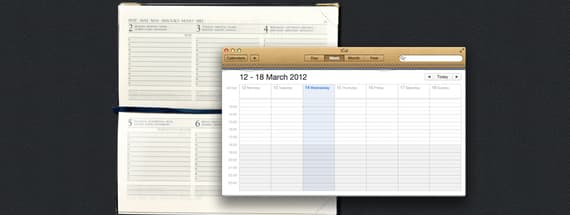

Skeuomorphic Design: What it is, Who uses it, and Why You Need to Know
skeu·o·morph [skyoo-uh-mawrf]
noun
A derivative object that retains ornamental design cues to a structure that was necessary in the original, even when not functionally necessary.
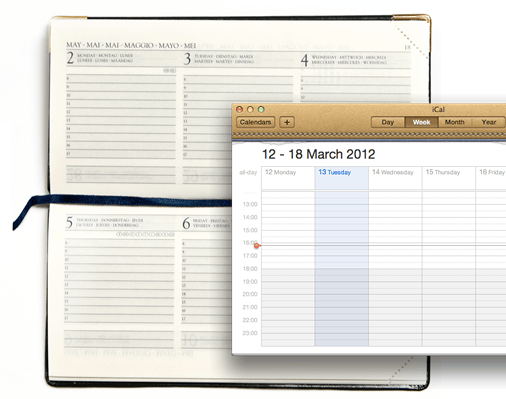
In terms of user interface, this means applications that are designed to have elements of them that look or behave like their real-world counter-parts. For example turning a digital page to resemble the experience of reading a physical book.
It is a style that Apple have been been utilizing for a long time, but lately seem to be pushing very hard. In particular on the iPad, which is a veritable smorgasbord of skeuomorphism.
This article looks at some of the most notable examples of the style, and weighs up the pros and cons. Is skeuomorphism the future of interface design?
Skeuomorphic Design In Action
Here is a round-up of what we think are some of best, most interesting or controversial examples of skeuomorphic UI in action. They are sourced from a variety of platforms, including desktop and iOS apps.
Apple iCal
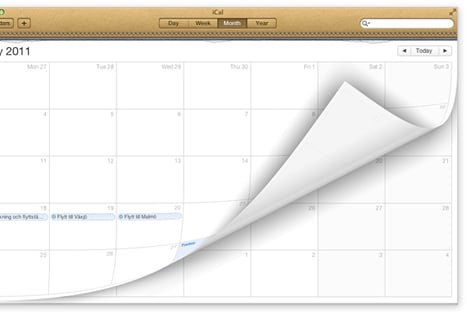
This is without a doubt the hot topic at the moment when skeuomorphic design is being discussed or debated. With the release of OS X Lion, Apple decided to bring the look and feel of Calendar for the iPad to it’s desktop counter-part iCal.
Some people love it, and others hate it. But the interesting thing about this example is that it used to be different. So unlike with most designs, we actually have the simple, clean version to directly compare it to.
Propellerhead Reason
Reason 1.0 was released in 2000, and unlike most existing DAW (Digital Audio Workstations) at the time, it featured a heavily skeuomorphic interface. Not just the dials and sliders on instruments, but the whole interface emulated a hardware rack and could even be flipped over to play with the virtual cabling.
76 Synthesizer
76 Synthesizer isn’t the first app to appear on the iPad that mimics the look of classic synthesizers and other instruments. Garageband from Apple, for example does it’s fair bit of that too. But we chose 76 Synthesizer because it is arguably the prettiest app out there doing it right now.
76 Synthesizer is a joy to use, and it just wouldn’t be same without it’s realistic, textured interface. It could be argued that this is because it’s not strictly a productivity app, so a big part of it’s appeal is in it's immersiveness, and the experience of using it.
iBooks
iBooks for iOS simulates a lot of the elements of reading physical books, from the wooden bookshelf that all of your titles appear sit on, to the action of turning pages, and being able to see what’s on the next page gradually before you’ve actually completed the action, just like real books.
Apple were careful not to compromise on usability in iBooks, by allowing you to simply tap the edge of a page to turn it, rather than requiring the swiping action every time, it actually made the experience easier than turning a real page. Which is very important, especially on the iPhone version when it could potentially happen 100’s or 1000’s of times per read.
Calculator
The Calculator app for Mac and many other calculator apps, have all decided to emulate the layout of real, physical calculators. Which when you think about it, is a bit of a head-scratcher.
From a usability stand-point, there isn’t actually any reason to emulate a small digital screen, or to have big number buttons on a desktop calculator app. All desktop or laptop computers have some some kind of keyboard for inputing numbers. And it isn't any easier to click big buttons with a mouse, than use the keyboard.. so it can only come down to design for the sake of familiarity.
Dashboard
The OS X dashboard and it’s widgets are intended to provide the user with information quickly and easily, much like glancing down at the dashboard of your car whilst driving. So it’s understandable to see that the OS X dashboard is ripe with skeuomorphic designs.
Widgets resembling real world objects allows us to instantly recognise their purpose, and differentiate them from each other. We can quickly associate the yellow square as a sticky for jotting down notes, and the analogue clock for the reading the time.
The Good Points
Here is a list of what we consider to be the skeuomorphic style’s main selling points. They include the benefits of using the style, and the improvements it can make for the user experience.
- Skeuomorphic interfaces feel instantly familiar Users like the feeling of familiarity when they see a new interface. Imagine sitting in the cockpit of a plane for the first time, and trying to fly it. You probably wouldn't have much luck, but trained pilots can fly different types of plane because they are familiar with the controls.
- Visually rich and engaging When compared to a minimalist design, there are many more visual cues and treats for the eye in skeuomorphic design, and that can make for a very engaging user experience.
- Demonstrates attention to detail A well executed skeuomorphic interface, takes time and effort. And the end result usually conveys that, by the attention to detail gone into making elements look realistic, and tactile.
- Designers love any excuse to use textures There’s no shame in it, and most designers will admit that they love any chance to use textures! Unless we’re going for a minimalistic or clean look of course. There are simply very few greater satisfactions than applying a subtle leather texture to interface elements or adding 1-2% of noise to the background layer.
The Bad Points
And to balance things out, here are the drawbacks to the skeuomorphic style. The problems that can arise when using the style incorrectly or innapropriately, and the negative effects that can have on the user experience.
- Skeuomorphic interfaces sometimes hinder usability Sometimes, doing things the fun skeuomorphic way isn't always the most efficient. For example an app might require a 3 or 4 finger gesture for something that could have been achieved with a single tap.
-
Shows an unwillingness to move on or innovate
Insisting on keeping things familiar in designs can often slow down innovation.
Remember, Apple's tagline used to be "Think Different". - Can result in poor use of space Skeuomorphic designs that have superfluous images or decoration are basically wasting screen real-state that for some users, especially mobile users is in short supply.
- Has the potential to look 'dated' sooner Just like in fashion. All user interfaces, no matter how modern and cool they look now, get old and become 'dated'. The problem with skeuomorphic design, is that the more out of the ordinary something looks, the quicker it starts to look old and strange.
The Alternative
Obviously there are lots of alternatives to skeuomorphic design. But in terms of modern user interface design, one style in particular jumps to mind. That is of course Microsoft’s Metro design language.
The Metro Design Principles
The design principles behind Metro are similar to those of the Swiss style and Minimalism. Basically, the content should always be the star of the show, and there shouldn’t be any superfluous graphics, text or effects. The Metro style also favours big interaction areas, rather than small buttons.
Text plays a big part in the Metro design style. It isn’t as some people believe the most important thing (we’ve established that that is the content!) but it should clean, elegant and hierarchical. Text in Metro interfaces usually utilizes size to differentiate importance.
One thing Metro definitely doesn’t condone is skeuomorphism.
Windows 8
Microsoft’s upcoming Windows release has been announced, and we can see from the consumer previews that it is heavily adopting the Metro design language.
Windows 8 is designed for both touch interaction on tablets, and phones and mouse interaction on desktops and laptops. Although the default setting is the Metro design view that can be seen in the screenshot to the right, Windows 8 will also feature the classic desktop view that current and previous versions of Windows use.

Wow, great article. There’s such an immediate pick up and use quality to some of these interfaces. I do wonder if the initial intuitiveness will fade with use of time, and to a frequent user may become more of a hindrance.
That’s an interesting point Damian, I use some of the interfaces mentioned here on a daily basis, but not for “mission critical” stuff, so I haven’t noticed any hindrance. I think if professional apps such as Photoshop adopted a skeuomorphic interface it would definitely start to bother me eventually.
Beautiful post layout & design.
Thanks Sequoia
though i think it can be very useful to easily understand an interface (like with the propellerhead interface for audio devices), i find this most often pretty annoying usability-vise. i don’t need to plug a virtual cable into a virtual mixing desk or flip a page in a virtual book..
damn! cool post design. Really really liking it… super easy to read..
Thanks GWD
@erwin schober: I definitely see your point. I can handle the page flipping thing in iBooks, even enjoy it. But when it’s your time and money on the line, messing about with virtual cables is unnecessary. Logic Pro combines a clean, uniform UI for the arrangement and production, with the realistic interfaces just for instruments and some third party plug-ins.
@tony thomas: i totally aggree 8) thanks for this post btw!
I miss FW tutorials :(
Hey, nice article. I don’t know what’s wrong with me, but from the designer’s point of view - I like this skeuomorphic design somehow (when it’s done right). The universal goal of every tool/app should be to provide clarity (every useful information is right on the screen or one click/touch away), minimum action steps to achieve desired goal ... and pleasure of using - it’s aesthetic . Those bad points named in the article are not only dangers of skeuomorphicism - it could also relate to minimalist or any kind of design in general. And I don’t see anything wrong with your examples like iBooks. There’s control variety for better usability. On iPad (or when anything runs in fullscreen) there’s not even problem with design coherence - when everything works great within the app. Graphics trends are changing every few years, but the good (well executed & polished) design remains ...
Thank you for a great article. To the list of Bad Points I’d add Risk of Bad Taste
What I mean is that with a skeuomorphic design, as opposed to a more abstract or neutral design, you risk loosing clients/users to what they might think is an ugly or wrong design for the object it associates to in real life, which is clear in the love/hate case of Apple’s iCal an Address Book. I quickly had the leather look removed on my mac, allthough I never tamper with theese things. The leather look with the torn off paper edges was just too weird and, to me at least, totally useless. It doesn’t serve a functional or tactile purpose like the design of the synth and the Propellerhead instruments does, and it did not associate well to my real world - I would never choose a light brown leather calendar book in real life either
The Microsoft Metro design reminds me of Sony’s user interfaces. It’s very interesting to see if it can survive the conservativeness of users.
@Michael Junge: Absolutely, I hadn’t thought of that before but you’re right, I would have definitely gone with a much sleeker looking black leather book if I was really choosing it in a store. Trying to cater to everybody’s tastes could open up a can of worms though, for example if Apple let users customise the appearance of apps too much the UI would end up all inconsistent and reminiscent of MySpace profiles.
@Matheus: Don’t worry, we haven’t forgotten about the FW tutorials
I believe it is more nostalgia than function.
Hey Tony, I’m glad FW wasn’t forgotten
It’s ok to give you a tip for tutorials?
Cinemagraphs, animations…
Would be cool to show what FW animations can achieve!
“Familiarity” is in the eye of the beholder.
Your pro’s and con’s are right at the forefront of debate in my media design class, which seems to always default to a less is more approach. I think skeuomorphism makes some basic technology more user friendly to the less technically savvy users, who are more apt to use it if it looks and functions in a real life “sim”.
Great article…I found the term “skeuomorphic design” on a gizmodo thread, and googled it and found here…I knew the concept, but not the term.
I generally like the more “realistic” designs. Delicious Library on the Mac, who’s look has been “borrowed” for a whole bunch of Apple’s iApps, is just fantastic with it.
The eye candy appeals, and I remember playing with Reason…possibly back in 2000 in fact, and thinking the cable view was really neat, but I also remember that I found trying to use the “dials” with the mouse counter-intuitive and frustrating. So, the plus and minus right there.
Please, please, please don’t use “it’s” when you mean “its”. This typo reduces your credibility, and this is a real pity.
Example: Apple decided to bring the look and feel of Calendar for the iPad to it’s desktop counter-part iCal.
This should be: Apple decided to bring the look and feel of Calendar for the iPad to its desktop counter-part iCal.
You use “it’s” (a contraction of “it is”) correctly here: It could be argued that this is because it’s not strictly a productivity app.
Otherwise, you wrote a great article and I really appreciate your contribution very much, indeed. Thank you.
I’ve used a PC for over twenty years and was a die hard to the end. I got an Iphone about a year ago and am scratching my head wondering why I didn’t make the move to Apple sooner (somehting I plan to do in the next year). Everything about it leaves the geek out of the equation which makes using computers easier. I don’t care if a geek thinks I should use his interface that he is familiar with on his terms in his way. I don’t care if he thinks it’s easy. He is most likely forgetting that he has years of experience writing sofware where as I don’t. I care that it’s easy to, intuitive and allows me to get the job done and that’s what Apple has brought to the table with skeuomorphic application and their other software. Real world usage is continues and three dimensional. what skeuomorphic apps do is give you a feeling of continuity and fluidness. Geeks might not care or get it, but the end users who are using the software who aren’t geeks do which is the average user.
* Skeuomorphic interfaces sometimes hinder usability
* Can result in poor use of space
* Has the potential to look ‘dated’ sooner
That’s exactly what I think of Metro, how it’s currently used in Windows 8. 500x500 pixel tiles on a 1980x1020 resolution, you have to be fucking kidding me. That’s an area of like 20 cm², total waste of space. Metro can be very beautiful too, look at the Zune interface, but Metro just tries to make a tablet out of a desktop PC.
*it’s* and *its* do not have the same meaning.
I’m sorry, but most of your “selling” points don’t.
1. “Skeuomorphic interfaces feel instantly familiar”: Wrong. Familiar interfaces feel familiar. It just depends on what you’re accustomed to. Besides, your example doesn’t even meet the definition of skeuomorphism: the pilot getting into the cockpit of a new plane isn’t dealing with something that represents an obsolete technology.
Further, for someone who’s not used the older technology, a skeuomorphic design is simply obtuse, and hard to understand. Skeuomorphism is a function of the object. Familiarity isn’t.
2. “Visually rich and engaging”: what if the original was clean and simple? Also, if you can’t make a rich and engaging interface in a new medium, you’re not doing design, you’re doing glorified decoration. You’re the wall painter, not the architect.
3. “Demonstrates attention to detail” and “Designers love any excuse to use textures” - who, exactly, are these supposed to be selling points for? Do designers not always pay attention to detail? What does it matter if the user sees them doing it or not? That’s not why they’re doing it, is it? And, frankly, what a designer wants to do with the graphic design detail of a particular work should have nothing to do with altering the design’s intent and priorities.
If you think there’s a necessary tradeoff between ‘eye candy’ and content, you don’t really understand either graphic design, or interface design.
What about other, non-visual outputs? The shutter sound wav file included in digital cameras and camera apps comes to mind.
Great article and nice review! Everything’s a lot easier when the app you’re using reminds you of some other interface you’re familiar with. And HTML5+CSS3 can make it real on the web.
So basically, take anything interesting or creative and just go with pure functionality. Sometimes people like a little sizzle with their steak you retards.
العاب فلاش http://www.d2ja.com
العاب بنات http://www.d2ja.com/c1.html
العاب تلبيس http://www.d2ja.com/c2.html
العاب طبخ http://www.d2ja.com/c5.html
Amazing post and tips. Thanks Tony for share your experience
This Helvetica Neue Light or whatever is the text font, is illegible.
I sincerely apologize for the mis-use of “it’s” but come on, I’m only human! It could be worse, atleast I know how to use their/there/they’re correctly, right?
And as for the debate going on, lighten up
. It is based on my own personal experiences, so I realise it may not be to everybody’s taste.. but it’s only supposed to be a fun informative blog post!
I absolutely love the metro design principles but don’t always agree that Microsoft have properly executed them. Usability although slick sometimes means than an over-emphasis on content mean that the UI is often cluttered with text and your attention often s averted for. What’s important.
Skuomorphic design on the other hand draws your eye straight to what’s important but then often gets in the way of the best user experience.
This is a great article, perfect balance of pros and cons. A brilliant read.
html5 ! wow thanks ! great !
Tango, Buenos Aires, Arjantin ve Montevideo, Uruguay kökenli bir dans ve müzik türüdür. Dansla beraber gelişen müzik tarzı da aynı adla anılmaktadır.
Thank you bro ! great html5 !
İstanbul yogayı akşam olup da yorgunluktan bitkin, ya bir randevuya, yahut da bir yemek davetine gitmek için dışarı çıkamayacağınıza kanaat getirmiş bir halde evinize döndüğünüz vakit kaybettiğinizi sandığınız enerjinizi tekrar kazanmak ihtiyacını duyarsınız, 10 dakika kadar adali yumuşama tatbikatı yapınız.
istanbul pilates istanbul pilates merkezi
Great Article. I forwarded it on Clayton Morris’ thread where he posted the Ouster of Forstall. Main item of contention being Apple does not want to endorse his Paradigm of staying skeumorphic. So this was a great non-biased article to at least let the average reader understand what is this “skewer—doooer—-morpher-thingy?”
Both thumbs up Guys, and I’ll throw up Two Toes as well to boot.
Well, both, skeumorphic and metro desing have their pro’s and cons. Actually, I use both of them interfaces daily, because I have a Lumia 800 mobile phone and also an iPad. There are things I love about metro design, exemple clarity and visual purity of interface, althought it’s sometimes difficuilt to orientetate in some menus (music and videos). Take iCal for example or iBooks, which look nice, but their usability is more or less restricted due their interface. Also, on mobile device, they sometime run really slow (iBooks). So it’s mostly people’s choice if they want to feel like in their own livingroom or to use minimalistic, yet sometimes a little cold metro.
Congratulations for your beautiful designs!
“I sincerely apologize for the misuse of “it’s” but come on, I’m only human!”
@Tony Thomas, how about correcting these mistakes? Being human is exactly what makes you capable of contextualizing words and sentences (among other things), which is something spell-checkers can’t quite do..
Apart from that, really insightful article!
I just wanted to say: Congratulations! Excellent work in this article. Both, in content and visually.
I think the metro design language is incredible, it’s easy to undestand and its somehow minimalistic. But sometimes I miss the colors and shapes of a good Skeuomorphic Design.